




AI video studio for shop owners, coaches and creators

Your idea becomes a video. Published everywhere, at the right time.

Write one sentence. Vidcica drafts the script, you approve it, then the AI edits the video with voice, subtitles and music. Publish it right away or schedule it on your 5 networks.

  • No credit card
  • Secure payment with Stripe
  • No commitment
Publish toTikTokInstagramFacebookYouTubeLinkedIn
to create your video
≈ 3 min
published in one click
5 networks
of video (Studio plan)
Up to 3 min
voices and subtitles
FR · EN

From idea to published video, in 4 steps.

You stay in control of the script. No credits are taken before you approve it.

  1. Your idea

    3 tips to save time in the morning, upbeat tone, for busy parents.

    Step 1

    Describe your idea

    One sentence is enough, or paste your own script. Choose the length, the format and the voice.

  2. Your script

    Do you run every morning? Here are 3 tips.

    Pack your bag the night before

    11 credits · 139 left
    Step 2

    Approve your script

    Change a sentence, change the tone. The exact cost shows before you start the video.

  3. AI editing

    Animated subtitles · “Chill” music

    Step 3

    The AI edits the video

    Footage, voiceover, subtitles and music, put together and ready to post.

  4. Publishing

    TikTok · Instagram · Facebook

    Tuesday 6:00 PM

    Scheduled ✓
    Step 4

    Publish or schedule

    Now, or on the day and at the time you choose, on all your networks.

One video. Five networks. At the right time.

Connect your accounts once. From then on, each video goes where you want, when you want, while you prepare the next one.

  • Instant publishing to TikTok, Instagram, Facebook, YouTube and LinkedIn
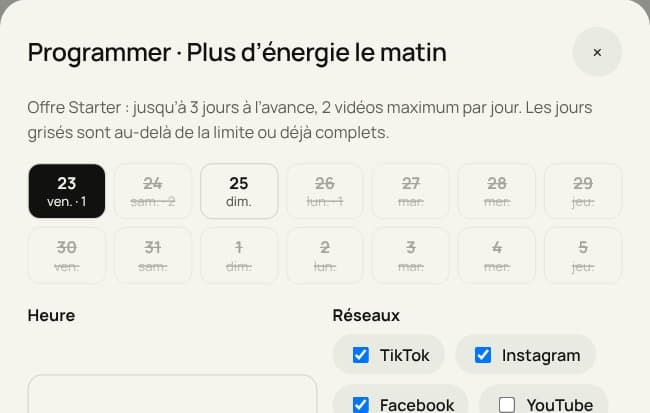
  • Schedule ahead: 3 days on Starter, 7 days on Pro, no limit on Studio
  • Live status for each network: scheduled, published, analytics
Video to publishClothing store · 12s
  • TikTokScheduled · Tue 6:00 PM
  • Instagram ReelsScheduled · Tue 6:00 PM
  • FacebookScheduled · Tue 6:05 PM
  • YouTube ShortsScheduled · Tue 6:10 PM
  • LinkedInScheduled · Wed 8:30 AM
How far ahead can you schedule?

Starter: up to 3 days ahead, 2 videos a day.

Videos ready to post, not drafts.

Every video comes out with the voice, subtitles and music already in place. Vertical, square or horizontal.

Made with VidcicaAI voiceover
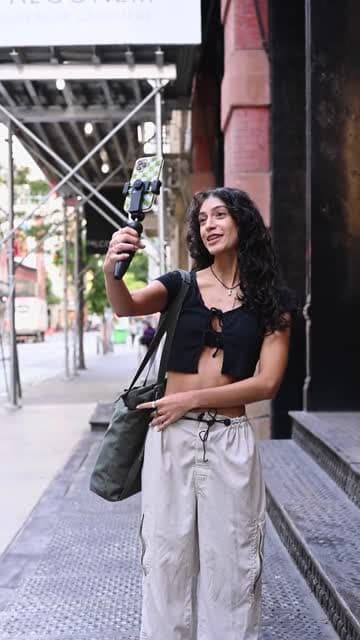
A natural voice in French or English, generated from your script. Turn the sound on.
Made with VidcicaAnimated subtitles
Burned in word by word, readable even without sound.

The whole studio, in one tool.

From writing the script to the ad campaign, Vidcica covers the whole video workflow.

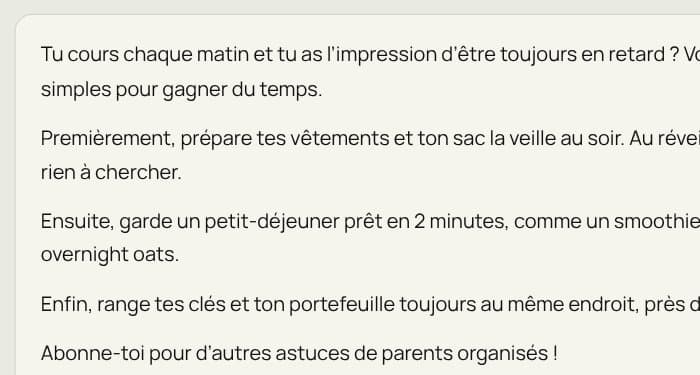
  • Script shown as editable text

    Editable script

    The AI writes the text, you edit it before the video. The script stays available afterwards.

  • Voiceover generated on a video

    Natural voiceover

    Lifelike voices in French and English, laid over your video.

  • Video with animated subtitles

    Animated subtitles

    Styled, in sync, readable without sound.

  • Scheduling calendar

    Scheduling

    Pick the day and the time, Vidcica publishes for you on each network.

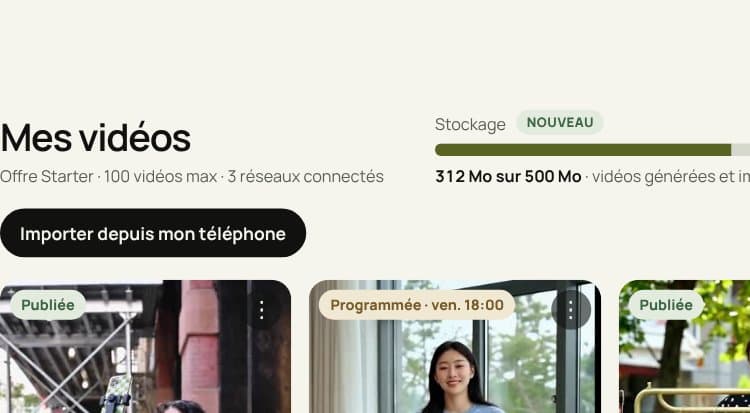
  • Video library and storage gauge

    Library and storage

    Up to 4 GB depending on your plan. You can also import videos from your phone.

  • Results of an ad campaign

    Campaigns and leads

    Boost your best video as a Meta ad and collect the contacts who are interested.

Powered by the best video models:KlingSeedanceLTXVeo 3.1

Built for your line of work.

If your customers are on social media, Vidcica keeps you visible every week. Pick your business:

Restaurants & food

Restaurants & food

  1. Today’s menu, told in 20 seconds
  2. Behind the scenes of service and the chef’s touch
  3. The signature dish, told as a story

One video a day, scheduled for 11 AM, just before lunch.

Try it with my business
  1. Made with Vidcica
    Today’s menu, told in 20 seconds
  2. Made with Vidcica
    Behind the scenes of service and the chef’s touch
  3. Made with Vidcica
    The signature dish, told as a story
See the Restaurants & food page →

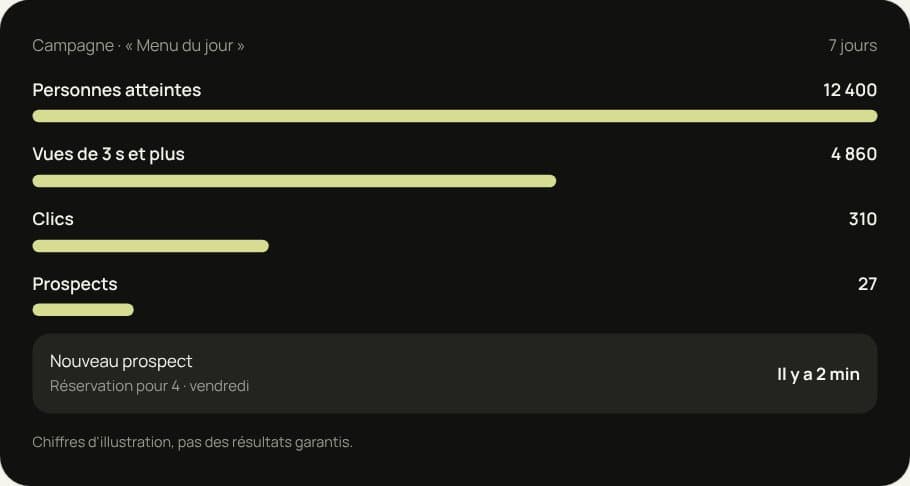
Your best video becomes an ad.

One click on “Boost”: Vidcica creates the Meta campaign (Facebook and Instagram) from your video, and the leads land in your dashboard.

  • Budget and audience set in 3 questions
  • Contact form built into the ad
  • Leads sorted in the Leads tab
Campaign · “Today’s menu”7 days
People reached
12,400
Views of 3s or more
4,860
Clicks
310
Leads
27
New leadTable for 4 · Friday
2 min ago
Illustrative figures, not guaranteed results.

Simple pricing, no surprises.

Start for free. Move up a plan when your videos take off.

Free

To discover Vidcica

US$0/ month

0 credits for Stock videos

Free stock footage · pay-as-you-go credits for scripts

  • Videos up to 15s · 720p
  • Royalty-free stock footage library
  • 1 connected network
  • 30 MB of storage · 10 videos
  • Not included, Voiceover and subtitles
  • Limitation, Videos with the Vidcica logo
Starter

To publish every week

US$28/ month

150 credits / month

Kling and Seedance AI models

  • Everything in Free, plus:
  • AI voiceover + animated subtitles
  • Videos up to 30s · 720p
  • 2 connected networks
  • Scheduling up to 3 days ahead · 2 videos a day
  • 500 MB · 100 videos · import from your phone
  • Basic analytics
  • Limitation, Videos with the Vidcica logo

Pro

Most popular

To sell with video

US$51/ month

300 credits / month

+ LTX, Seedance Pro, Kling Pro in 1080p

  • Everything in Starter, plus:
  • Videos up to 1 min 30s · 1080p
  • 4 networks · 5 accounts per network
  • Scheduling up to 7 days ahead · 4 videos a day
  • No Vidcica watermark
  • Meta ads + lead capture
  • 1 GB · 500 videos
  • Brand kit · advanced analytics

Studio

For teams and agencies

US$111/ month

600 credits / month

+ Veo 3.1, the most realistic model

  • Everything in Pro, plus:
  • Videos up to 3 min
  • Unlimited scheduling · unlimited videos a day
  • Unlimited networks, accounts and campaigns
  • 4 GB · unlimited library
  • Dedicated support and onboarding
  • 🔒 Secure payment with Stripe
  • Credit cost shown before each video
  • Cancel at any time
  • Credit top-ups from 50 credits
Compare plans in detail
Detailed comparison of the four Vidcica plans
PlanFreeStarterProStudio
Credits per monthPay-as-you-go150300600
Maximum length15s30s1 min 30s3 min
Maximum quality720p720p1080p1080p
Generation models1367
Voiceover + subtitlesNot includedIncludedIncludedIncluded
Connected networks124Unlimited
Accounts per network115Unlimited
Schedule aheadNot included3 days7 daysUnlimited
Scheduled videos per dayNot included24Unlimited
Storage30 MB500 MB1 GB4 GB
Library10 videos100 videos500 videosUnlimited
Import from your phoneNot includedIncludedIncludedIncluded
Vidcica watermarkYesYesNoNo
Meta ads + leadsNot includedNot includedIncludedUnlimited
Brand kitNot includedNot includedIncludedIncluded
SupportHelp centreEmailPriorityDedicated

Your money and your accounts are protected.

  • Stripe payments

    Payments go through Stripe, used by millions of businesses. Vidcica never sees your card number.

  • Official connections

    Your networks are linked through their official APIs. No password is stored, and you can disconnect an account at any time.

  • Your videos are yours

    Publish, download and use your videos for your business. Data encrypted in transit and at rest.

They publish with Vidcica.

  • “I used to hardly ever post. Now today’s menu goes out every morning on Instagram and Facebook, scheduled the night before.”
    First name L.Restaurant
  • “Every new listing becomes a video tour in 10 minutes. I edit the script and it’s published on my 5 networks.”
    First name L.Real estate broker
  • “I boosted my best video as a Meta ad and session requests came straight into my dashboard.”
    First name L.Fitness coach

Frequently asked questions

How do credits work?

A script costs 5 credits per block of 50 words. A video uses credits depending on the model and its length, and the exact cost is shown before you start it. Videos made with the Stock model (stock footage) are free. Your credits refill every month with your plan, and you can buy more at any time.

Can I edit the script?

Yes. The AI suggests a script as plain text. You edit it directly, like a document, then start the video. The script stays available afterwards in each video’s menu.

Which networks can I publish to?

TikTok, Instagram, Facebook, YouTube Shorts and LinkedIn. You connect your accounts once, then each video publishes in one click or on the date you choose.

How far ahead can I schedule a post?

3 days ahead on Starter (2 videos a day), 7 days on Pro (4 videos a day), with no limit at all on Studio.

How long can my videos be?

15s on Free, 30s on Starter, 1 min 30s on Pro and up to 3 minutes on Studio.

Who owns the generated videos?

You do. You can publish, download and use them commercially. Videos on the Free and Starter plans carry a small Vidcica logo, removed from the Pro plan up.

Is the voiceover available in several languages?

Yes, in French and English today, with natural AI-generated voices.

Can I cancel or get a refund?

You can cancel at any time from the Billing page, with no commitment. A renewal is refundable only if you ask on the same day and no credits have been used since.

Your next video is three minutes away.

Describe the idea. Vidcica writes, edits, subtitles and publishes for you.

Start for freeNo credit card